

Token Usage
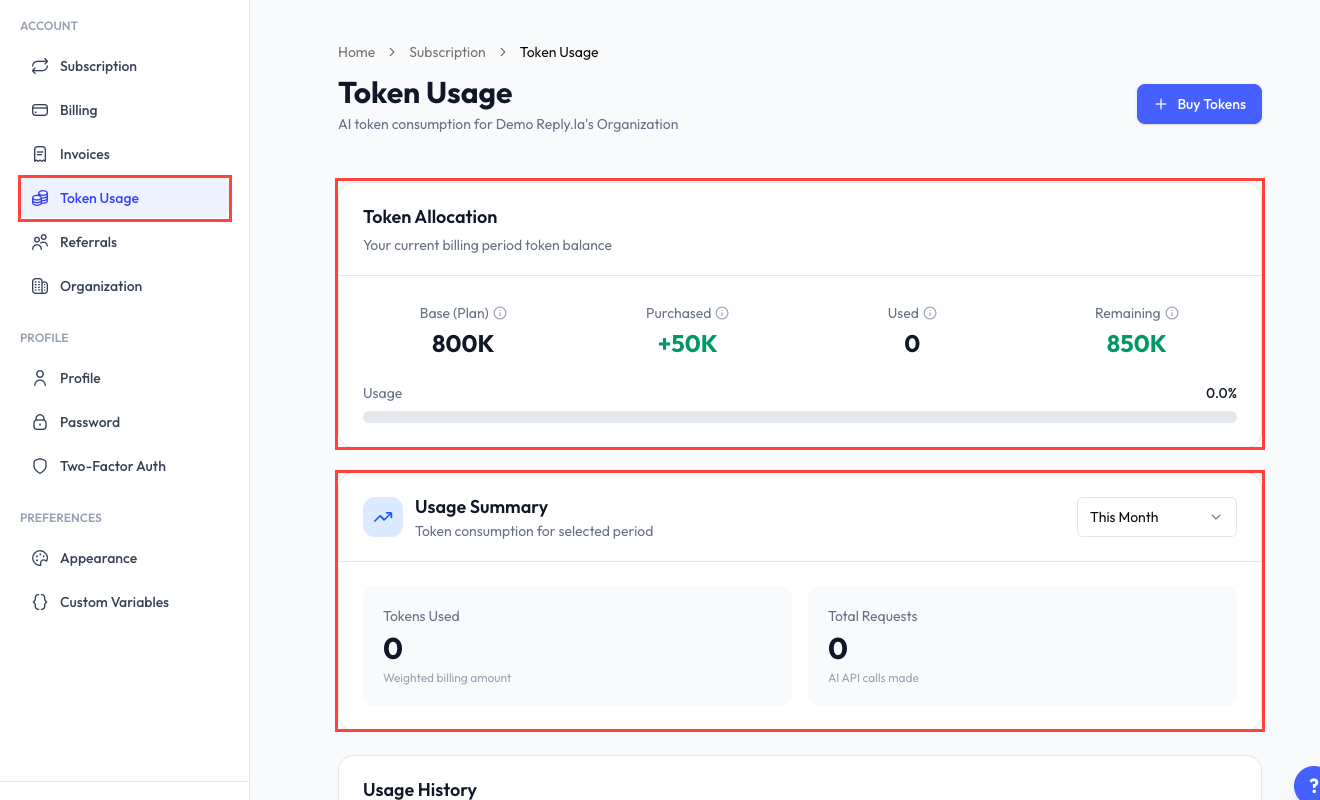
Open Token Usage
Click Settings > Token Usage.
Token Allocation
The allocation card explains where your available balance comes from:
- Base (Plan) - Tokens included with your subscription.
- Purchased - Token add-ons you bought.
- Granted - Tokens added as a bonus, adjustment, or promotion.
- Used - Tokens consumed during the current allocation period.
- Remaining - Tokens still available.
The usage bar shows the percentage consumed.
Usage Summary
Choose a period to review:
- Tokens used.
- Total AI requests.
- Total spend.
- Average AI cost per lead, when enough data is available.
- Token usage grouped by feature.
Usage History
The Usage History tab contains detailed AI-usage records. You can:
- Filter by chatbot.
- Filter by date range.
- Search for a contact.
- Review the feature, model, input, output, cached, reasoning, total, and estimated cost recorded for a request.
Token History
The Token History tab is your balance statement. It shows credits and deductions such as plan allocation, purchases, grants, adjustments, and usage. Open a row when a detailed statement is available.
Buying More Tokens
Click Buy Tokens to open the token add-on flow. The current price and available package are shown before checkout.
What Happens When Tokens Run Out?
When no usable tokens remain, AI features can be disabled until tokens are added or the applicable allocation resets. Check the remaining balance and buy tokens before it reaches zero to avoid interruption.