

AI Memory
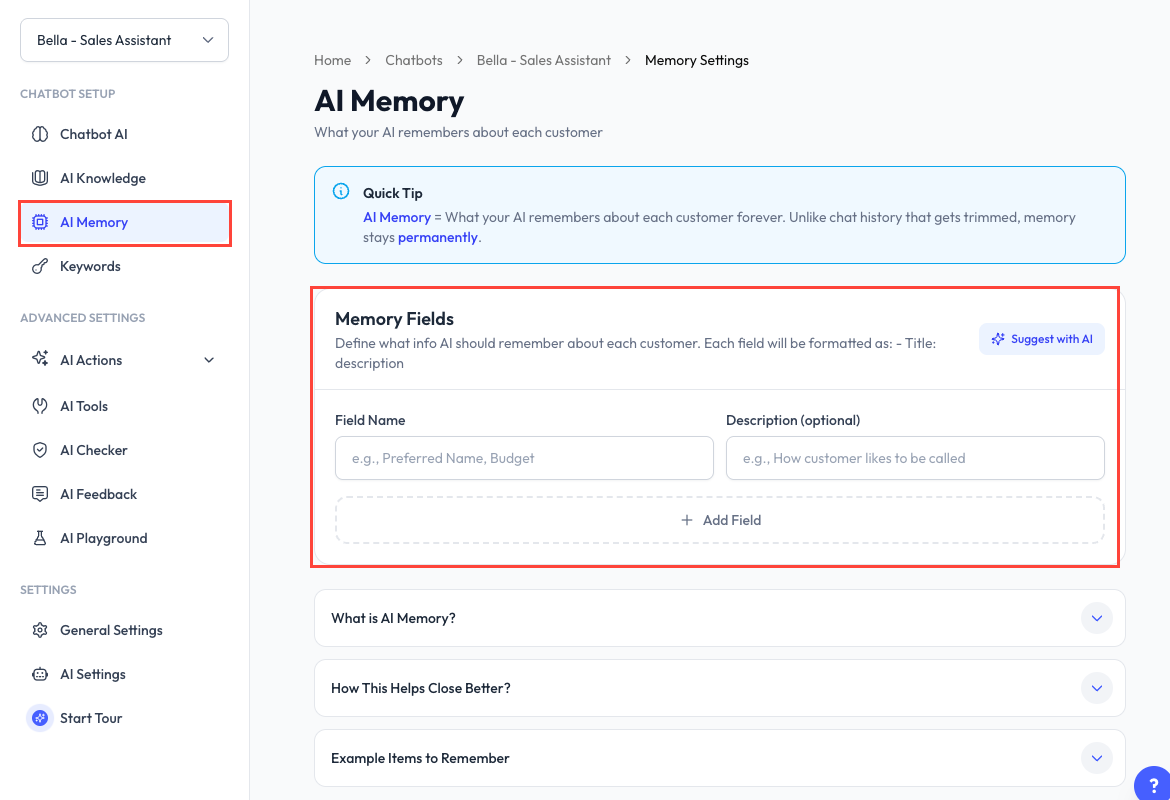
AI Memory stores structured information about each customer, such as a preferred name, purchase history, budget, or service preference. The chatbot can use these details in later conversations with the same customer.
Memory and Conversation Context
These are separate types of information:
| Type | Purpose |
|---|---|
| Conversation context | Recent message history used to understand the current conversation. Older context can be trimmed. |
| AI Memory | Structured customer details saved across conversations until cleared. |
Use memory only for information that remains useful in future conversations. Avoid storing unnecessary sensitive information.
Define Memory Fields
- Open a chatbot and go to AI Memory.
- For each field, enter a Field Name and an optional description.
- Click Add Field to create another field.
- Save the page.
The description tells AI what should be stored in that field. For example:
| Field | Description |
|---|---|
| Preferred Name | How the customer wants to be addressed. |
| Past Purchases | Products or services the customer previously bought. |
| Preferences | Relevant size, style, colour, or service preferences. |
| Delivery Area | The customer's usual delivery area. |
Suggest with AI
Click Suggest with AI to analyze the chatbot's training and propose relevant memory fields. Review each suggestion before adding it. The analysis uses platform tokens.
Review Memory for One Contact
Open the contact's conversation in Inbox, then expand Memory in the details panel. You can review the stored values or use Clear Working Memory for that contact.
Clear Memory for Every Contact
The Danger Zone is available after a device is connected:
- Clear All Context removes recent chat history for all conversations connected to this chatbot but keeps saved customer memory.
- Clear All Working Memory removes saved customer details for all conversations but keeps chat history.