

Device Manager
A device represents one WhatsApp phone number connected to ReplyLa. Device Manager shows the connection and messaging health of every device in the organization.
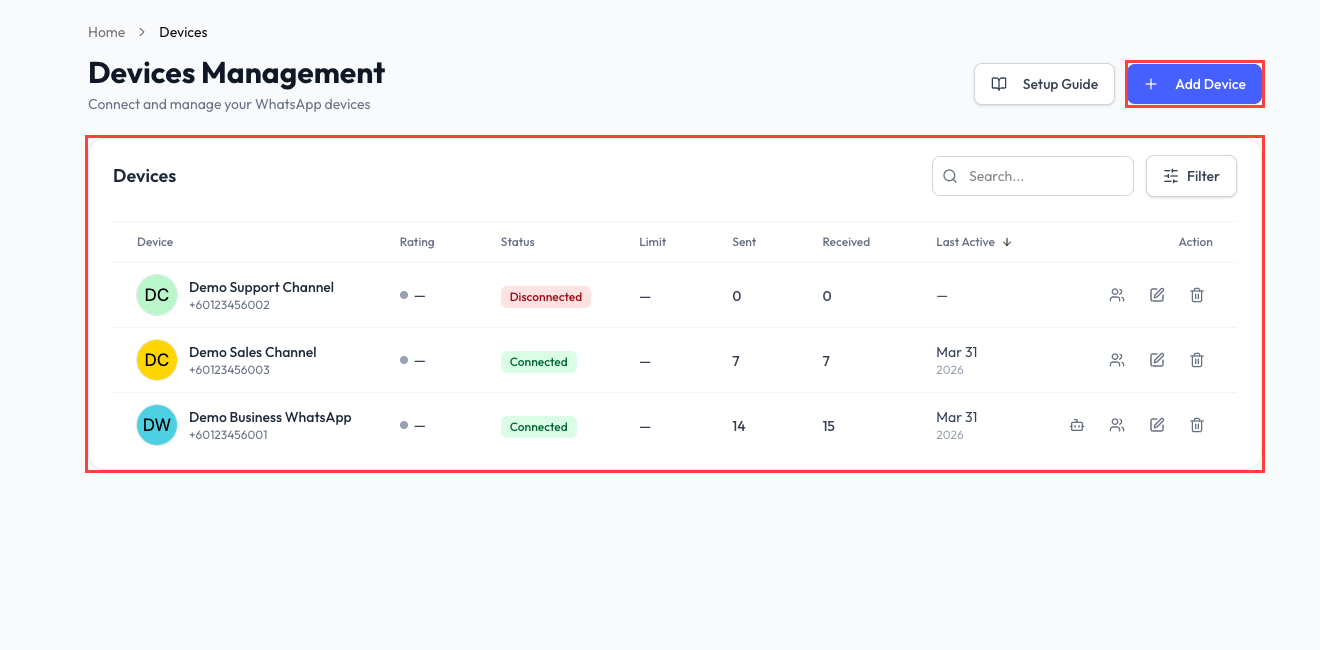
Device List
Use search, status filters, provider filters, and column sorting to find a device. The table can show:
- Device name and phone number.
- Connection type.
- Quality rating.
- Connection or health status.
- Messaging limit.
- Sent and received message totals.
- Connection date.
Available actions can open the linked chatbot, show contacts for the device, open device settings, or delete the device. Actions depend on your organization permissions.
Status and Health
| Status | Meaning |
|---|---|
| Connected | The connection is available for messaging. |
| Pending | Setup is not complete or is still being processed. |
| Disconnected | The connection needs attention before messaging can continue. |
A connected device can still show a health warning from Meta. Open its settings and review the displayed action when the badge is not healthy.
Add a Device
Click Connect WhatsApp and choose the option that matches the number's current setup. See Connect a Device for the full flow.
The number of devices available depends on your plan. The button shows when the organization has reached its current limit.
Open Device Settings
Select the device name or settings action to review its configuration and available connection actions. A chatbot can also connect or disconnect the device from its General Settings page.
One WhatsApp device can be assigned to only one chatbot at a time.
Delete a Device
Deleting a device is permanent. ReplyLa requires you to type the device name before confirming.