

Settings
Subscription
View your current plan, manage add-ons, and check account limits.
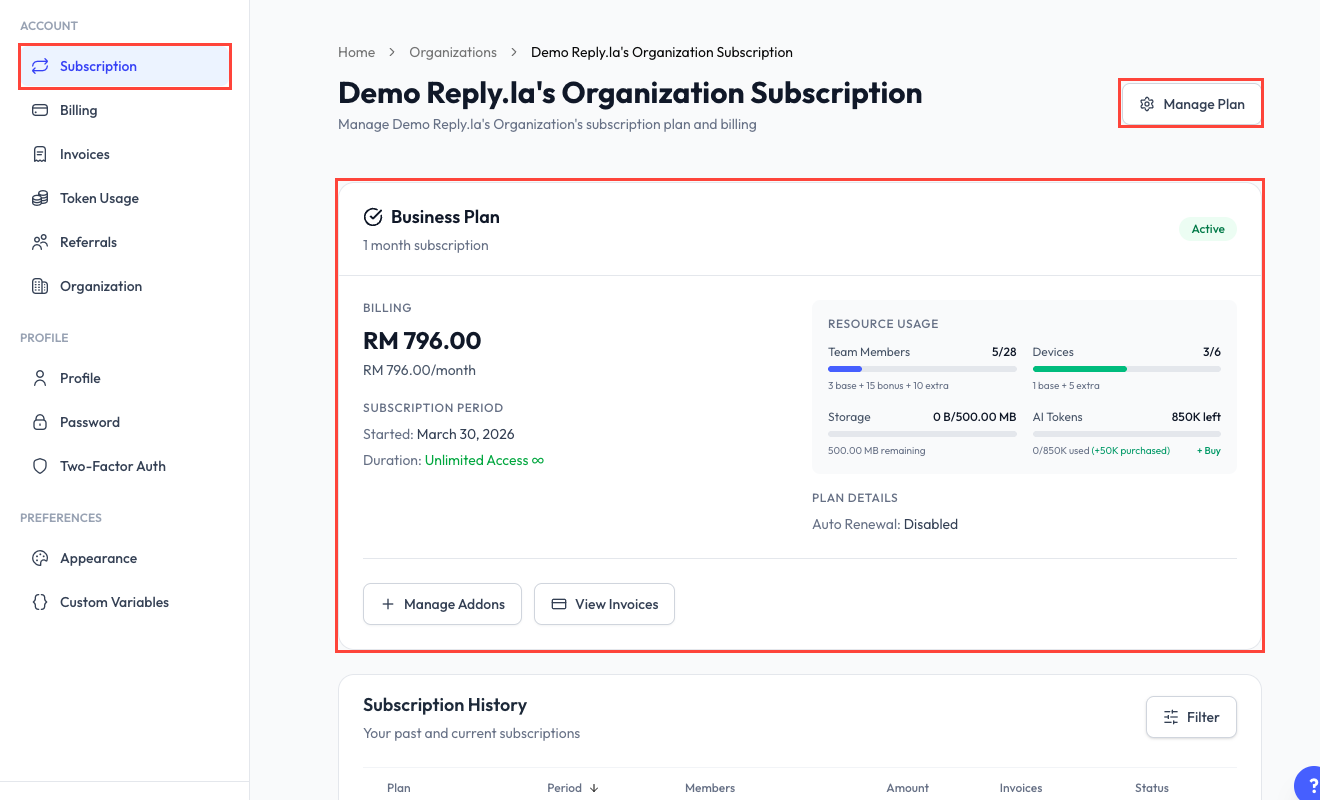
Open Subscription
Click Settings > Subscription.
The page shows your current plan, subscription status, billing cycle, expiry or renewal information, and the resources included in the account.
Manage Your Subscription
Click Manage Subscription to review the options available for your current plan. Depending on the subscription, you may be able to:
- Change to another available plan.
- Add team-member capacity.
- Add WhatsApp device capacity.
- Add storage.
- Buy additional AI tokens.
Some subscriptions do not allow self-service plan changes. If the page says Plan Changes Not Available, contact ReplyLa support for help.
Understand Your Limits
Limits are shown in the product because they can differ by plan or custom subscription. Check the current plan card instead of relying on a fixed number from an older package.
Important limits include:
- Team members.
- WhatsApp devices.
- Storage.
- Monthly or granted AI tokens.
- Feature-specific limits such as campaigns, rules, or tools.
The add-on cards show the current price and capacity before you continue to checkout. Review that information before confirming a purchase.
Common Questions
If Buy Tokens is available on your subscription page, you can purchase a token add-on without changing your base plan.
Some plans, demo subscriptions, and custom subscriptions require support assistance. Follow the message shown under Manage Subscription.
Open Token Usage to review your allocation, usage records, and token history.