

Chatbot
Chatbot AI
Configure business information, language, style, sales flow, FAQs, and AI rules.
Video Walkthrough
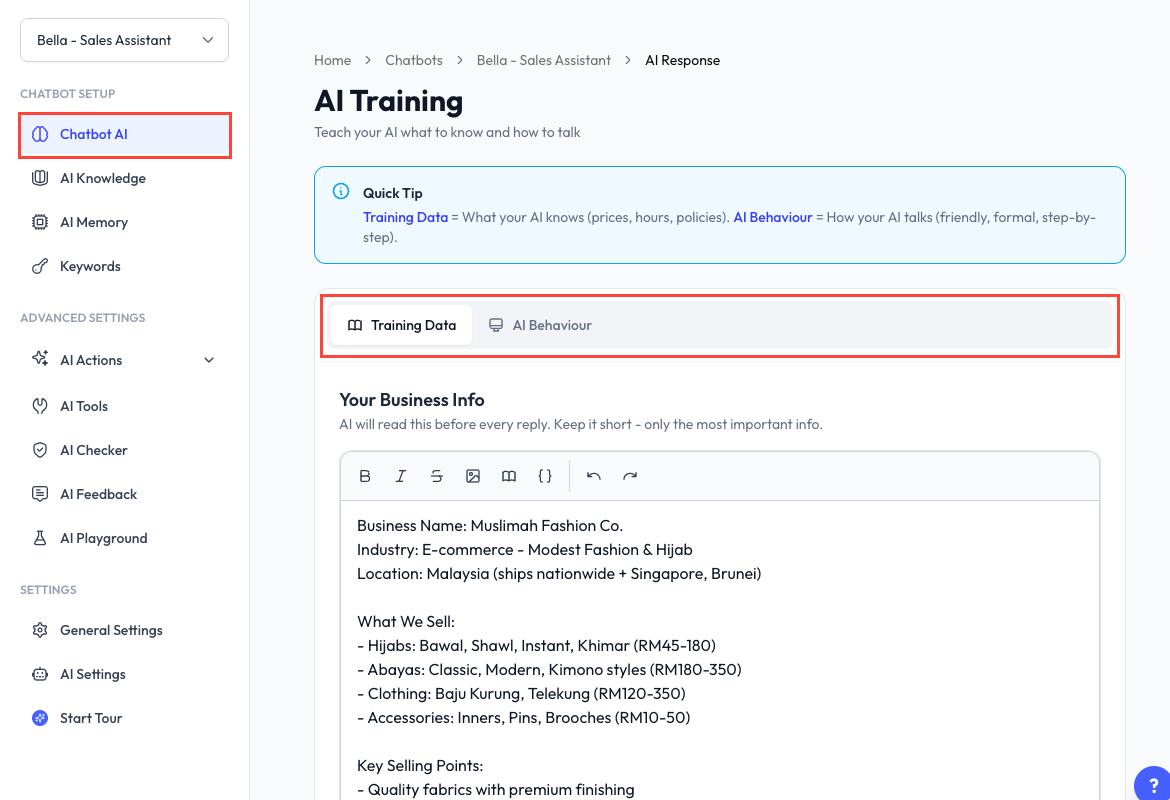
The video and screenshot show Custom mode. ReplyLa also provides an optional Guided mode.
What Is Chatbot AI?
Chatbot AI is the training page for one chatbot. Use the toggle at the top to enable or disable AI replies, then edit the training in the mode selected under AI Settings.
Guided Mode
Guided mode is a structured editor with six tabs:
| Tab | What to add |
|---|---|
| Business Info | Business description, products, prices, contact, location, hours, delivery, booking, and payment. |
| Language and Style | AI role, business name, language, tone, and reply structure. |
| Closing Flow | Ordered steps that guide the conversation toward its goal. |
| FAQs | Common questions and approved answers. |
| Constraints | Rules and boundaries the AI must follow. |
| Custom Instruction | Anything important that does not fit another section. |
Saving Guided mode composes these sections into the training data and system prompt. Use the generated preview to inspect the result.
Custom Mode
Custom mode keeps the original two raw editors:
- Training Data - Short facts the AI should always know.
- AI Behaviour - The full system prompt that controls role, tone, response format, and conversation flow.
Saving Custom mode keeps the prompt exactly as you wrote it.
Reference AI Knowledge
The rich-text editor can insert an AI Knowledge reference. A referenced entry must be enabled and included in a completed training run. ReplyLa warns you when the prompt points to disabled knowledge.
Training Data vs AI Knowledge
| Training Data | AI Knowledge | |
|---|---|---|
| Best for | Short, essential facts | Catalogs, long FAQs, and detailed policies |
| How it is used | Included with the chatbot's core training | Searched when relevant |
| Maintenance | Edit on Chatbot AI | Add, edit, then Train or Retrain on AI Knowledge |
Save and Test
- Save the training page.
- Open AI Playground.
- Test questions from each important topic and every closing-flow branch.
Common Questions
Open AI Settings, find AI Training Mode, and confirm the conversion. The switch is shown only when Guided training is enabled for your account.
If a previous prompt exists, ReplyLa keeps using it until you fill a Guided section or switch to Custom to edit it directly.
Keep it concise. Move long or frequently changing content to AI Knowledge.