

AI Checker
AI Checker reviews a generated answer before it is sent to the customer. If the answer does not pass the selected accuracy level, ReplyLa can regenerate it before falling back.
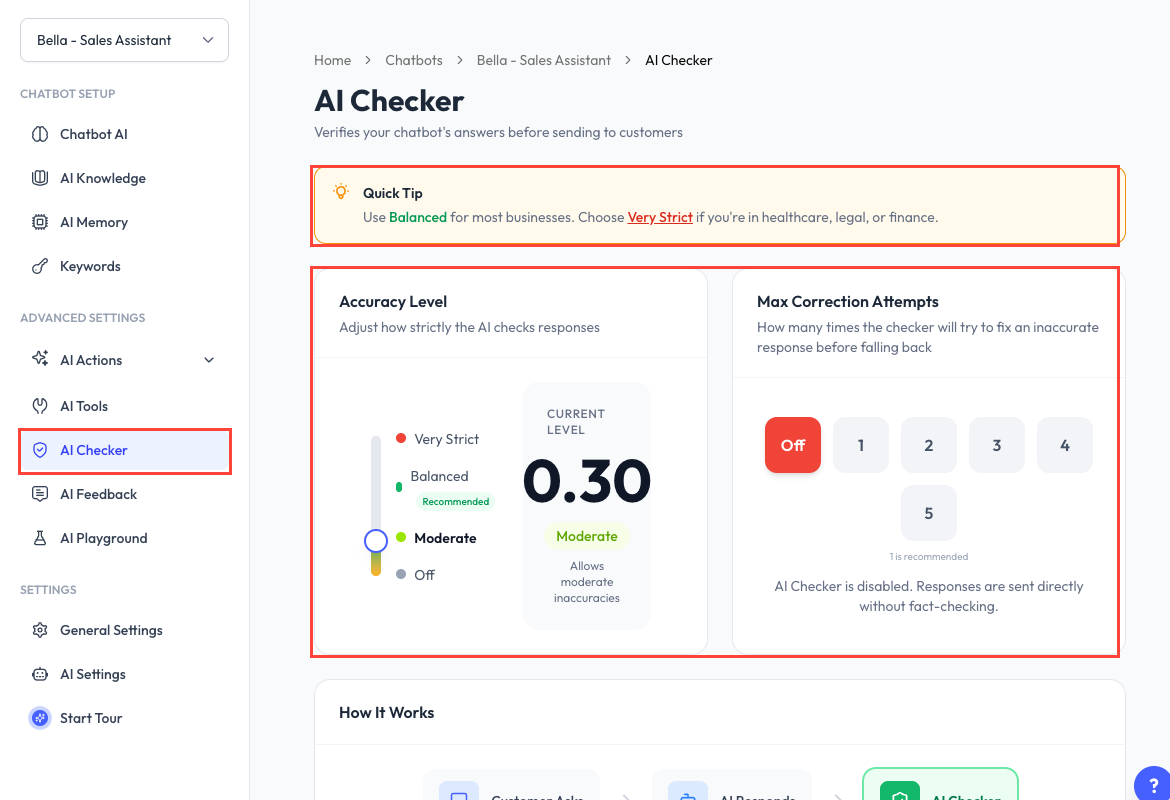
Configure AI Checker
- Open a chatbot and go to AI Checker.
- Choose an Accuracy Level.
- Select the maximum number of correction attempts.
- Save the page.
Setting the accuracy level or correction attempts to Off disables AI Checker.
Accuracy Levels
| Level | Behaviour |
|---|---|
| Off | Sends responses without the additional fact-checking step. |
| Moderate | Allows some uncertainty and prioritizes faster replies. |
| Balanced | Catches meaningful errors while ignoring minor noise; recommended for most businesses. |
| Very Strict | Rejects responses that are not fully grounded. |
Very Strict is useful when incorrect information has a high impact, but it can reject more answers and increase response time.
Correction Attempts
Choose between 1 and 5 correction attempts. One attempt is the recommended starting point.
- Fewer attempts are faster and use fewer tokens.
- More attempts give the checker additional chances to regenerate an inaccurate reply.
When a reply passes, it is sent to the customer. When it fails, ReplyLa tries to regenerate it up to the configured limit before using its fallback behaviour.
Test the Setting
Use AI Playground to test factual questions, missing information, and ambiguous requests. Strong training data and well-maintained AI Knowledge give the checker better information to verify against.