

File Manager
File Manager
Upload, organize, preview, download, and manage shared files.
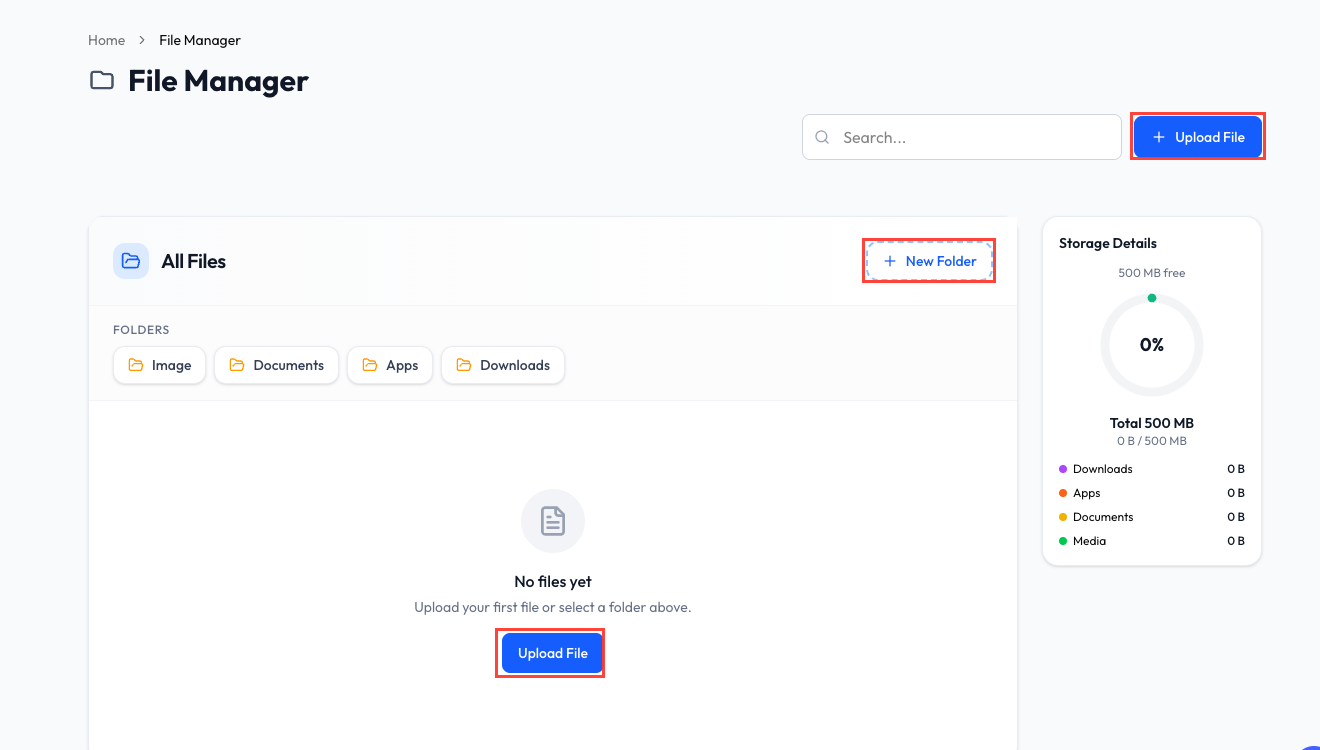
What Is File Manager?
File Manager is your organization's shared media library. Files can be selected from supported ReplyLa features such as keyword sequences, templates, and conversations.
Find and View Files
Use the search field to find a file by name. The file list shows its type, size, upload information, and available actions.
Depending on the file type, you can:
- Preview it in ReplyLa.
- Download it.
- Copy its file link.
- Open its details.
- Select one or more files for deletion.
Upload Files
- Click Upload File.
- Select one or multiple files.
- Choose a folder or enter a folder name if needed.
- Add optional file details.
- Start the upload and watch the per-file progress.
The maximum size and allowed categories are enforced by your plan and shown in the upload dialog.
Organize with Folders
ReplyLa includes common folders such as Image, Documents, Apps, and Downloads. You can also:
- Create a custom folder.
- Open a folder to filter its files.
- Rename a custom folder.
- Delete a folder.
- Choose whether deleting a folder also deletes its files; otherwise the files move to the root.
Storage Usage
The storage panel shows:
- Used and remaining storage.
- Total storage quota.
- Usage percentage.
- Storage grouped by common folders or file categories.
Your quota depends on the active subscription and storage add-ons.
Supported Categories
ReplyLa supports plan-approved files in these categories:
- Images.
- Video.
- Audio.
- Documents, including common PDF, Office, text, and CSV formats.
The upload dialog is the source of truth for the current plan's allowed file types.
Deleting a file is permanent and may break a message, keyword sequence, or other feature that still references it. Check where the file is used first.
Common Questions
Yes. Select multiple files in the upload dialog and review the progress for each file.
You can delete only the folder and move its files to the root, or choose to delete the folder and all files inside it.
The file category may not be available on your plan, the file may exceed the size limit, or the extension may be blocked for security.