

Contacts
Merge Contacts
Combine two records for the same person, so all their conversations sit on one contact.
Sometimes one customer shows up as two contacts, usually because one record reached you without a phone number of its own. Merging puts their conversations on one contact, so your team sees the whole picture.
What Merging Does
- The other record's conversations move onto the contact you keep, and that record goes away.
- Nothing is sent to the customer.
- Each device keeps replying to its own conversation.
- You can undo it for 7 days.
How to Merge
- In the Contact List, find the contact you want to keep.
- Click ... in their row and choose Merge contacts. You can also use the merge button in the contact's preview panel, or Merge contacts under Quick Actions on the full contact page.
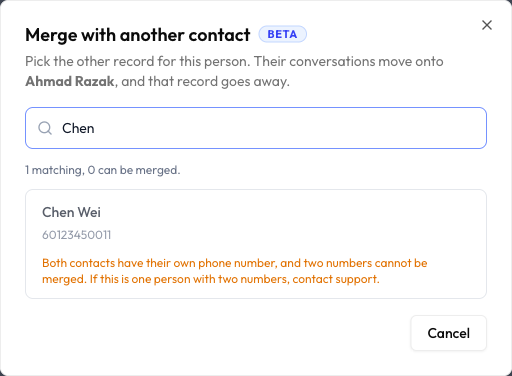
- Search by name or phone number and pick the other record. If a record can't be merged, the dialog tells you why.
- Check what will happen. The dialog shows which contact Stays, which Goes away, and which devices move.
- Click Merge.
Undo a Merge
You have two ways to undo:
- Right after merging, click Undo on the Contacts merged message.
- Later, open the contact's full page and go to Merged contacts. Click Undo. The card shows the date you can undo until.
Undoing does not unsend anything. If messages were sent to the merged devices since the merge, the card tells you how many.
The Merged contacts card can also list merges done automatically from what WhatsApp reported. You can undo those here too, while the Undo button is showing.
When a Merge Is Not Allowed
If a record can't be merged, it stays in the list with the reason beside it. These are the common ones:
| What you see | What it means |
|---|---|
| Both contacts have their own phone number | Two numbers cannot be merged. If this is one person with two numbers, contact support. |
| The contact with a phone number has to be the one you keep | Merge them the other way round. Start from the contact that has the phone number. |
| Both contacts already have their own chat on the same WhatsApp number | Merging is for one person reaching you on different numbers. |
| WhatsApp has this contact paired with a different phone number | This may not be the same person. |
| One of these contacts has an identifier we do not recognise | This is usually an imported record. Merging it could send replies to the wrong place. |
| Test contacts cannot be merged | Contacts from Playground Mode can't be merged. |
Common Questions
No. Nothing is sent when you merge.
The Undo button is no longer available, and the merge stays as it is.
Last updated: 5 November 2026