

Settings
Invoices
Find, view, and download every Reply.la invoice for your organization.
All your Reply.la invoices are in one place, ready for your records or your accountant.
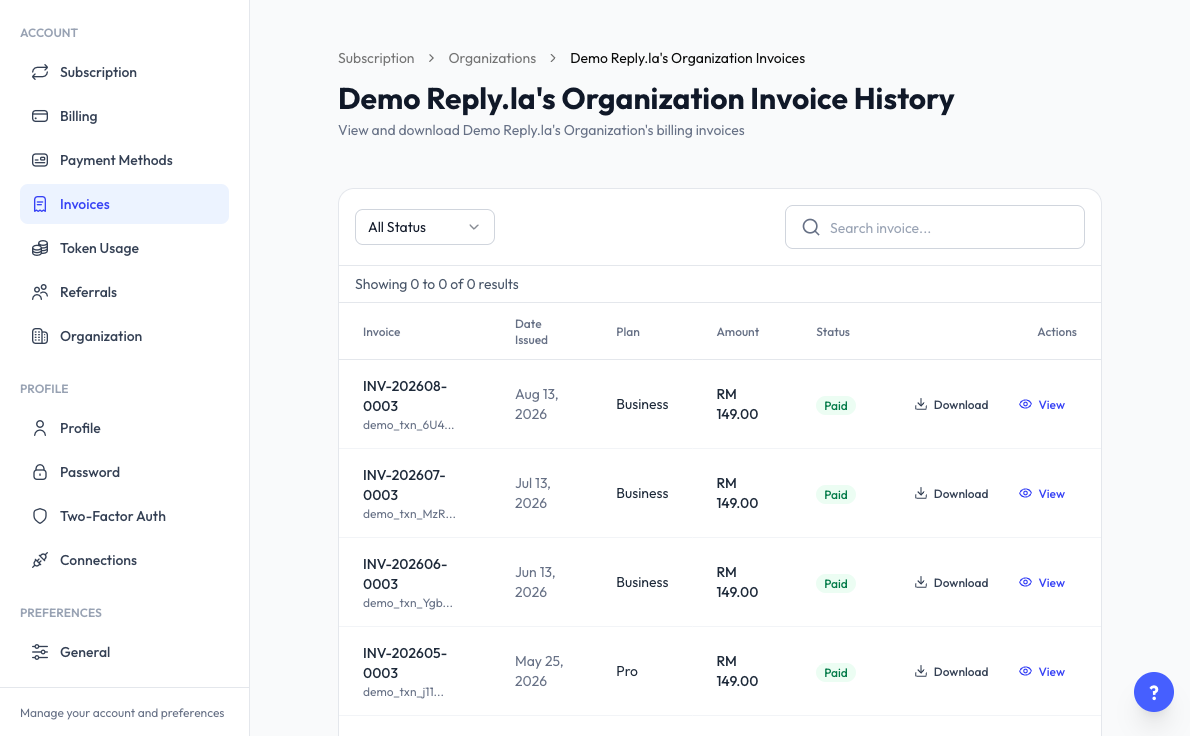
Open Invoices
Click Settings > Invoices. Only the organization owner sees this page in the Settings menu. You can also get here from View Invoices on Subscription or View All on Billing.
Find an Invoice
- All Status - Filter by Paid, Pending, Failed, or Refunded.
- Search invoice - Search your invoices.
Each row shows the Invoice number, Date Issued, Plan, Amount, and Status. Purchases made by Auto Reload are marked as automatic.
View or Download
- View - Open the invoice details, including payment information and the pricing breakdown.
- Download - Save a PDF copy for your records.
Common Questions
Your invoices appear here once you make your first payment.
No. Per-message fees are billed by Meta directly. See Pricing.
Last updated: 5 November 2026