

Settings
Billing
Review billing totals, your current subscription, and recent invoices.
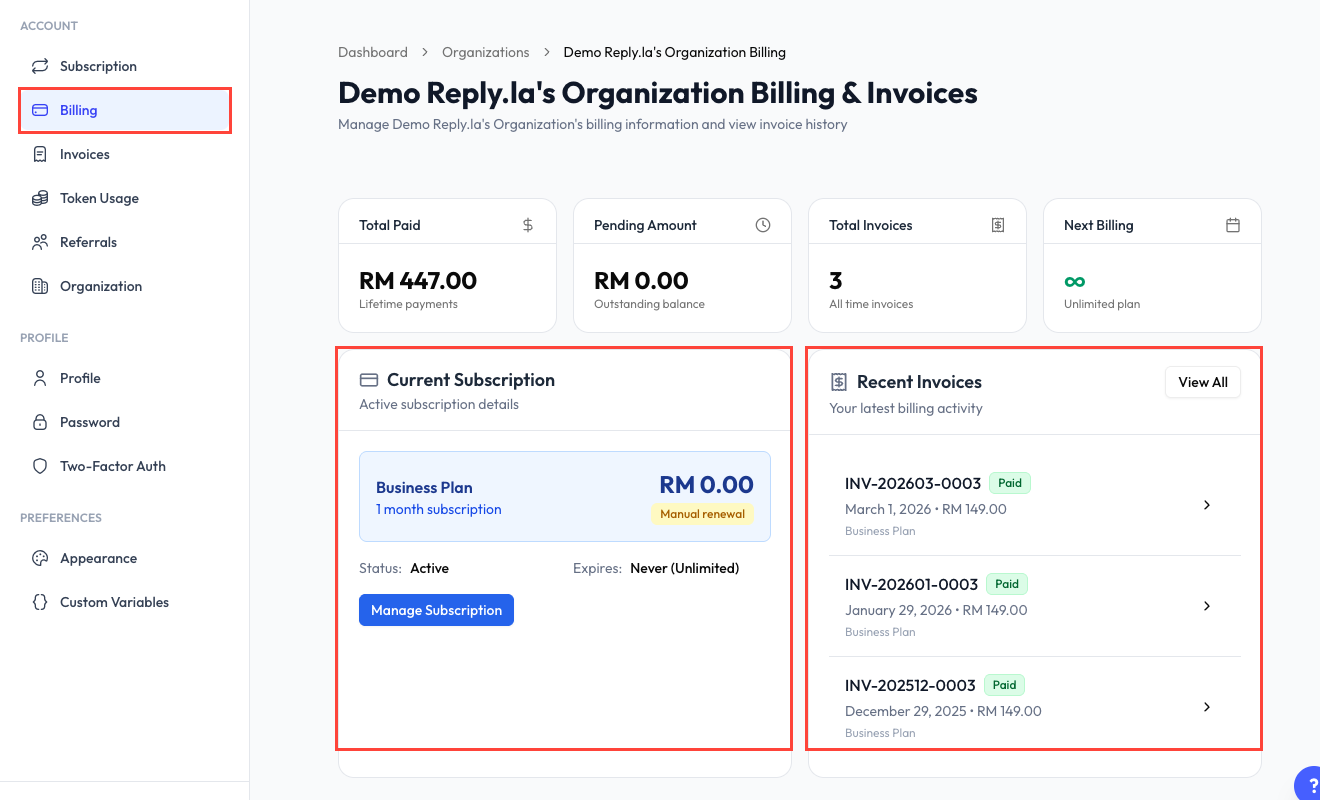
Open Billing
Click Settings > Billing.
Billing Summary
The cards at the top show:
- Total Paid - Lifetime completed payments.
- Pending Amount - Outstanding invoice balance.
- Total Invoices - Number of invoices issued.
- Next Billing - The next billing date, or the plan's no-expiry status.
Current Subscription
The subscription card shows the plan name, billing cycle, status, expiry information, and renewal type. Click Manage Subscription to review plan or add-on options.
Recent Invoices
The Billing page shows your latest invoices with their number, date, amount, plan, and payment status.
Click an invoice to open its details. Use View All, or open Settings > Invoices, for the complete invoice history.
Use the separate Invoices page when you need an older invoice or a downloadable copy for your records.
Common Questions
Click View All in Recent Invoices or choose Invoices from the Settings sidebar.
An invoice may still be awaiting payment or confirmation. Open the invoice to review its status and available payment action.
The Billing page focuses on billing totals, subscription details, and invoices. Payment choices are shown during the relevant checkout or invoice-payment flow.