

AI Feedback
AI Feedback collects answers that may need human review. You can verify the answer, provide a correction, and save the approved information to AI Knowledge.
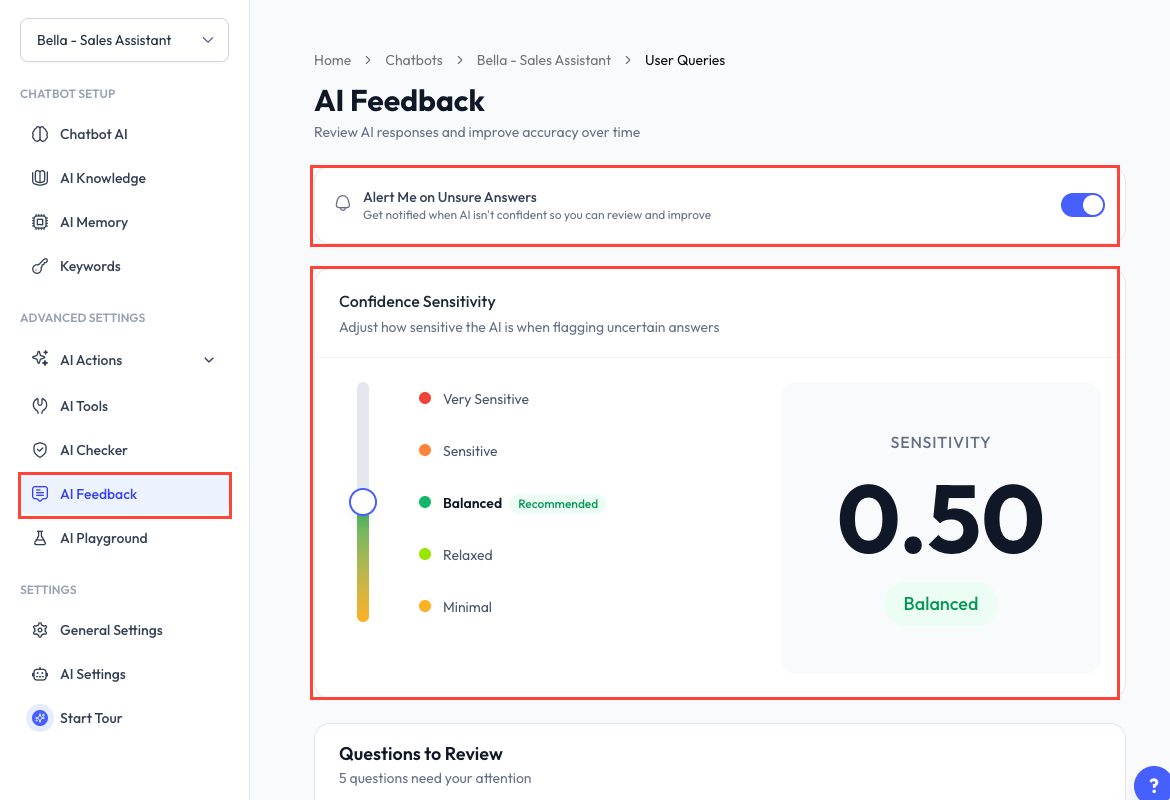
Enable Feedback Alerts
- Open a chatbot and go to AI Feedback.
- Turn on Alert Me on Unsure Answers.
- Choose a Confidence Sensitivity level.
- Optionally enable Hand off to a human when unsure.
- Save the page.
Automatic handoff uses the chatbot's Human Takeover configuration and requires Human Takeover to be enabled.
Confidence Sensitivity
| Level | Behaviour |
|---|---|
| Minimal | Almost never flags an answer. |
| Relaxed | Flags only clearly uncertain answers. |
| Balanced | Recommended starting point for most chatbots. |
| Sensitive | Flags most uncertain answers. |
| Very Sensitive | Flags almost everything that may need review. |
A higher sensitivity creates more review items. Start with Balanced, then adjust it based on the quality and volume of the flagged questions.
Questions to Review
The table shows the customer query, flag reason, date, and current status. Reasons can include:
- Low confidence.
- Possible hallucination.
- No matching knowledge.
- A manual flag.
Click Review to open the question and AI response.
Verify an Answer
If the Answer Is Correct
- Click Yes, it's correct.
- Select an existing knowledge base or create a new one.
- Click Save & Done.
If the Answer Is Wrong
- Click No, it's wrong.
- Enter the correct answer.
- Select an existing knowledge base or create a new one.
- Click Save & Done.
Choose Skip this question when the item does not need action. Skipped items are dismissed.
Saving a verified answer creates knowledge that can help with similar questions in future conversations. It does not rewrite earlier messages that were already sent.
Recommended Routine
- Review the queue regularly after launch or after major training changes.
- Correct high-impact topics such as price, delivery, refunds, and availability first.
- Combine repeated answers into a clear, reusable knowledge document.
- Test the updated answer in AI Playground.