

Conversation Window
Every WhatsApp conversation has a 24-hour window. While the window is open, you can reply with anything - text, images, voice notes. Once it closes, you can only reach the customer with a paid template message.
The Inbox shows this window status with a colored ring, so you can tell at a glance which leads you can still reply to without a template.
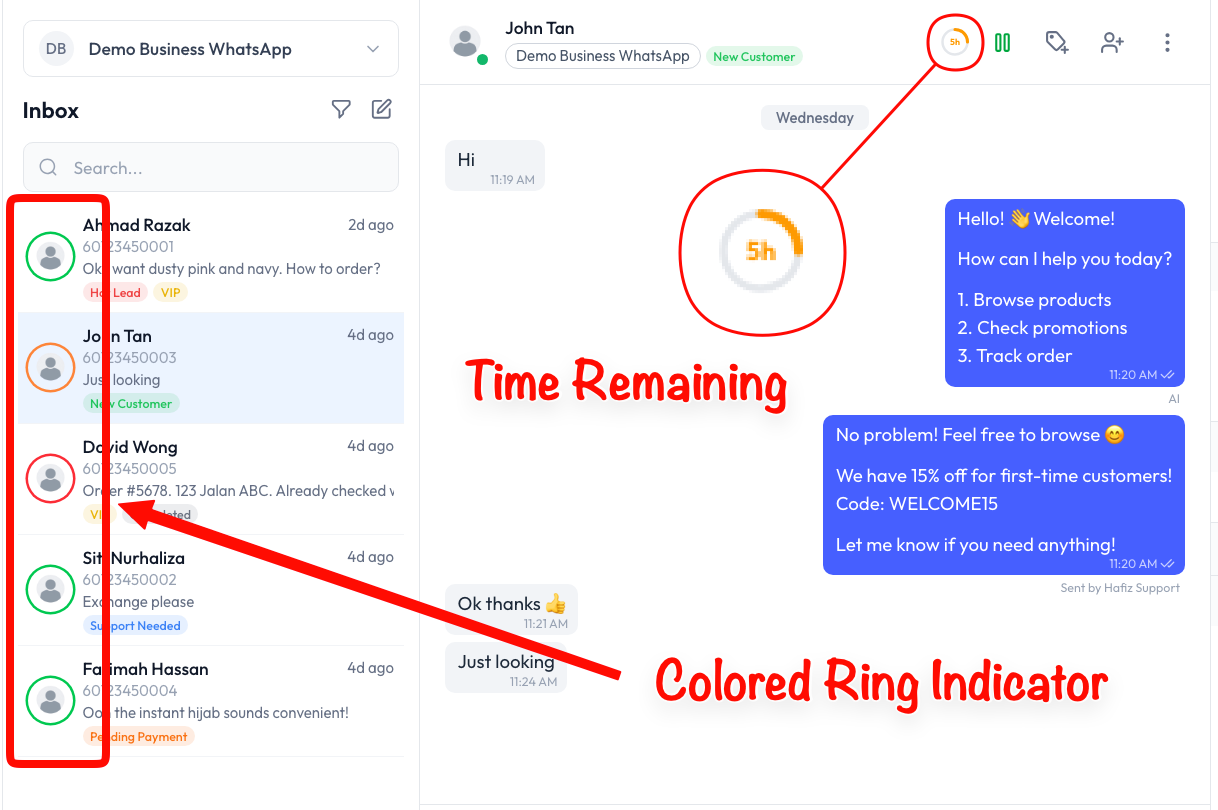
Where the Window Status Shows
The window status appears in two places for every conversation:
| Where | What you see |
|---|---|
| Conversation list (left panel) | A colored ring around the contact's avatar |
| Chat header (top of the open chat) | A countdown badge showing hours left, e.g. 23h or 5h |
Both update live as the window counts down.
Ring Colors
The ring color tells you the state of the window - and what you can send next:
| Ring | Window status | What you can send | Cost |
|---|---|---|---|
| Green | Open - more than ~6 hours left | Any message (text, image, voice) | Service message (1,000 free a month) |
| Orange | Closing soon - ~6 hours or less left | Any message - but reply soon | Service message (1,000 free a month) |
| Red | Closed | Approved template only | Paid template |
The Countdown Timer
When you open a conversation, the chat header shows a countdown badge - for example 23h near the start of a window, or 5h when it is almost up. This is the time left before the 24-hour window closes for that customer.
The window resets to a full 24 hours every time the customer sends you a new message. So an active back-and-forth conversation can stay green for as long as the customer keeps replying.
What Happens at Red
When the ring turns red, the window is closed. You can no longer send a free-form reply. To reach the customer again, you must send an approved template message, which Meta charges for per message.
For a full explanation of free vs paid messages, see the Pricing page.